Offline expense tracker · Updated 18 September 2026
An offline expense tracker that works with the internet off.
Klera records your spending, budgets, investments, loans and udhaar entirely on your phone. No account, no bank login, no server holding your financial history — and every feature works in airplane mode, including the AI that answers your money questions. Free on Android and iPhone, AES-256 encrypted, with an encrypted backup in your own Google Drive.
Free · No sign-up · Airplane-mode tested
The airplane-mode test
Plenty of apps say "private." Offline is the stronger claim because you can check it yourself in about a minute: turn off the network and try to use the app. Here is what Klera answers.
- Does it work in airplane mode?
- Every screen. Adding expenses, budgets, charts, calculators, udhaar, statement import, export — and the AI assistant — all run with the network off, because there is no server to reach.
- Does it need an account?
- No sign-up screen at all. No email, no phone number, no OTP. Open the app and add your first expense.
- Where does the data live?
- In a SQLCipher database on your phone, encrypted with AES-256. The key is generated on first launch and held in your device's secure hardware.
- What does it upload?
- None of your financial data — not a transaction, balance, category, account or contact. Klera runs no analytics and no usage tracking. The network is used for five things you control, listed in full further down this page.
- What about the backup — isn’t that the cloud?
- It is your cloud, not ours. The backup goes into a hidden app-private folder in your own Google Drive, encrypted with a passphrase only you know. Klera requests only the drive.appdata scope, so it cannot see anything else in your Drive, and it never holds your passphrase — the file is unreadable by us and by Google.
And here is how to run the same test on any tracker, ours included. Install the app, add two or three expenses, then:
- Turn on airplane mode Fully. Not just Wi-Fi off — mobile data too.
- Force-quit the app and reopen it Cached screens do not count. A fresh launch does.
- Run the whole loop Add an expense. Edit a category. Open the charts and the budget screen. Run a calculator. Export your data. If there is an assistant, ask it a question.
- Watch for the tells A spinner that never resolves, an empty chart, a "you're offline" banner, a screen that renders but will not save, an AI that says "check your connection".
If step three completes end to end, the work is happening on your phone and the data has nowhere else to be. If it stalls anywhere, that feature lives on someone else's computer — and so does the data behind it.
What you still get
Offline does not mean stripped down. Giving up bank auto-sync costs you a convenience; it does not cost you the tools.
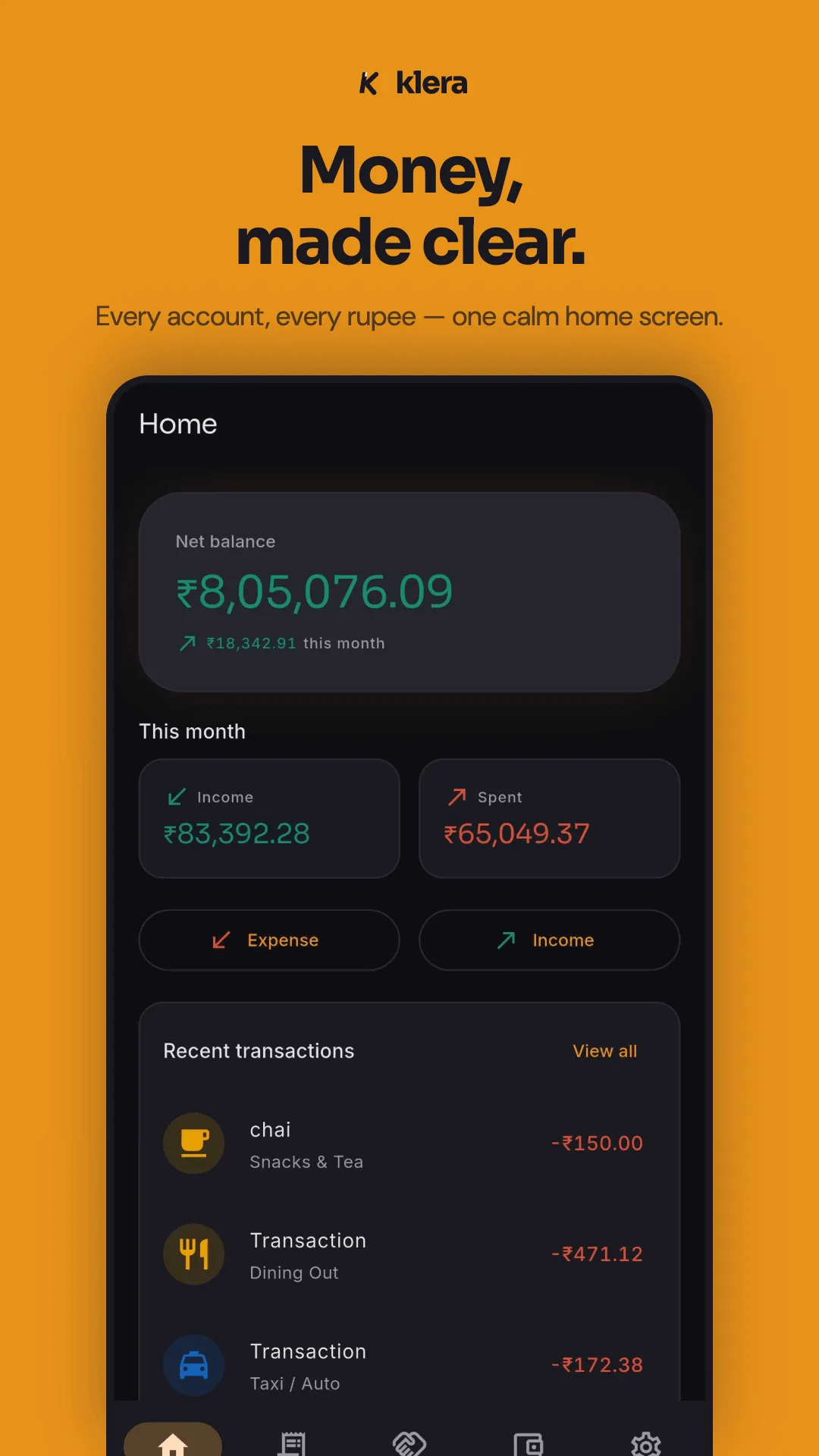
- Three-tap expense entry — amount first, category, done. Typed or spoken, English or Hinglish.
- Every account, one net worth — cash, bank, UPI wallets and cards, netted against loans and card dues.
- Investments tracked on-device — stocks, gold, fixed deposits, SIPs and insurance, with allocation and XIRR returns.
- A full loan manager — amortisation schedules, EMIs, rate changes and payoff progress.
- Budgets with alerts — one monthly total split across Needs, Wants, Investments and Learning, warning you before you overshoot, plus savings goals you can lock an account to.
- Udhaar tracking — a private IOU ledger with UPI settle links, partial settlements, a full settlement history and a per-person statement PDF.
- Bills that post themselves — scheduled rent, EMIs, SIPs and subscriptions written into the ledger on time, with reminders.
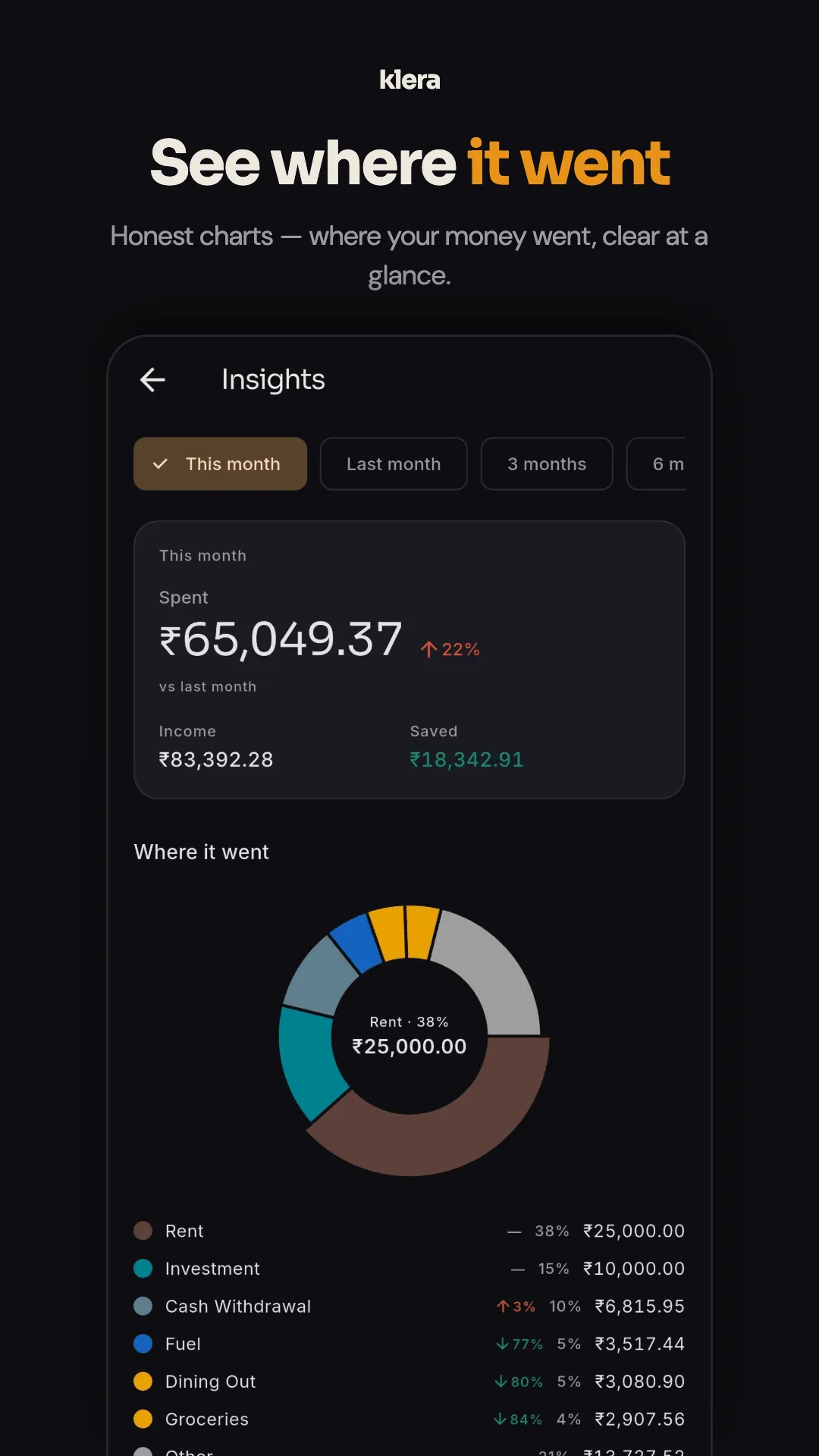
- Insights — spend heatmap, category trends, top merchants, cash vs digital, savings rate, and a yearly Money Wrapped.
- Widgets on your home screen — eight of them on Android: net position, this month, budgets, udhaar, upcoming bills, goals, accounts and quick add. They show last-known figures offline, and amounts are masked by default while app lock is on.
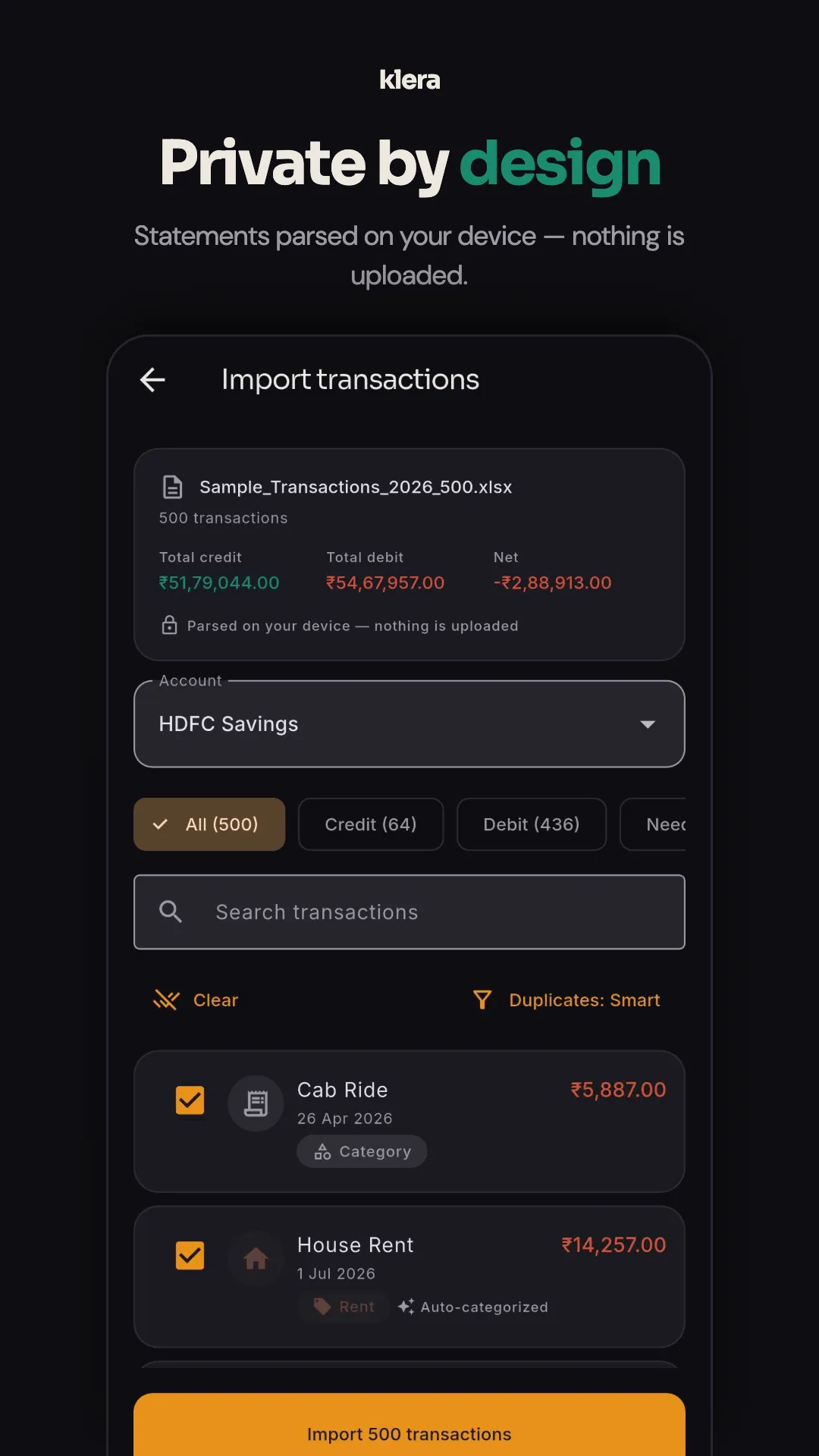
- Bring your history — statement import from PDF, Excel or CSV, parsed on your phone with auto-categorisation and duplicate detection.
- Take it away again — CSV and PDF export with April–March financial-year presets and a category-wise P&L summary, plus a one-tap JSON export of everything.
- Recoverable, not just private — an encrypted backup in your own Google Drive, refreshed daily or weekly, restored with a passphrase only you know.
- Locked down — biometric or PIN app lock, and screenshots blocked on financial screens.
The AI works offline too
Nearly every AI feature added to a finance app since the chat box arrived works the same way: package the transactions, send them to a language model on a server, print the reply. It is the newest and quietest way an "offline" app becomes a cloud app.
Klera's answer is different: on the phone, with no model at all. Ask Klera splits the job in two. Understanding the question is pattern-matching against a catalogue of 50 question shapes across 22 families — affordability, spending breakdowns, budgets, goals, udhaar, bills, EMIs, subscriptions, anomalies, habits. Answering it is arithmetic over the local ledger, by the same code that draws your charts. Neither half needs a server, so the assistant passes the airplane-mode test like every other screen.
- No cloud, no LLM, no network call. Klera calls no AI provider and bundles no language model. The conversation lives in memory while the screen is open and is never written to disk, logged or uploaded.
- Numbers are computed, not generated. A language model produces plausible text; this engine produces the same figure your charts would. Every answer shows the figures it used — safe-to-spend, monthly surplus — so the working is checkable.
- It refuses rather than guesses. Coverage is measured against 1,316 real phrasings and stands at 94%. The rest get "I can't answer that yet", plus examples of what it can. Tax and insurance advice are declined on purpose.
- English and Hinglish, typed or spoken. One honest caveat: dictation uses your phone's own speech recogniser, requested on-device, and without an offline language pack Android may transcribe through Google's. Typing keeps everything local.
- It logs as well as answers. Type "200 chai, 300 fuel, 200 movie" and three categorised expenses appear as cards you can tap to correct.
- Free, because it costs nothing per question. No tokens to buy means no reason for a premium tier.
Things you can ask with the network off
- Can I buy a phone for 30000?
- Where did my money go this month?
- Kitna lena hai Ramesh se?
- What bills are coming up?
- Anything unusual this month?
- What is my worst money habit?
The trade is real and runs the other way too: a cloud model understands a sentence nobody anticipated, and can write you a paragraph. Klera answers a known, growing set of questions exactly, and says so when yours is not one of them. For money, we think that is the right side of the trade. The full design is on the AI expense tracker page.
Offline vs. cloud expense trackers
| Klera (offline) | Typical cloud tracker | |
|---|---|---|
| Works fully in airplane mode | Yes — every feature | Read-only at best; most break |
| Account required | None | Email or phone, usually mandatory |
| Bank credentials | Never requested | Often required for auto-sync |
| SMS permission | Optional, allowlisted senders, parsed on-device | Blanket inbox access, commonly required |
| AI assistant | On-device engine — works offline | Cloud LLM — your ledger is uploaded |
| Where data is stored | Your phone, AES-256 encrypted | The provider's servers |
| Backup | Encrypted, into your own Google Drive | Automatic, into the provider's cloud |
| If the company shuts down | App keeps working; data is yours | Service and history disappear |
| Ads | Yes — but the ad network never sees your data | Often, plus upsells |
| Selling your data | Never | Check the policy — often permitted |
Cloud apps are described generally — features vary by product. The point is the architecture: if your data is on someone's server, its safety is their policy decision, not your setting.
What "offline" actually means — the buyer's guide
The rest of this page is the guide half: what the term means, how an offline tracker is built, which features genuinely need a server, and how to judge any app in this category — ours included.
- "Offline mode"
- The app tolerates a dropped connection. Your entries are queued and uploaded when the signal returns. The server remains the source of truth; you are typing into a waiting room. Most cloud trackers offer this, and it is a convenience, not a privacy property.
- Offline-first
- There is no server in the design. Nothing is queued because nothing is going anywhere. The database on your phone is the only copy that exists unless you choose to make another. This is what "offline expense tracker" should mean, and it is the only version that can be verified from the outside.
The difference shows up the moment you force-quit the app with the network off. Offline mode degrades. Offline-first does not notice.
How an offline expense tracker works
There is no magic in it. An offline tracker is what you get when you refuse to build the server, and then solve each problem the server would have solved on the device instead. Here is how Klera does it, piece by piece.
- The ledger is a local, encrypted database Every transaction, account, budget, goal, loan and IOU is a row in a SQLCipher database on the phone, encrypted with AES-256. The key is generated on first launch and held in the device's secure hardware; it never leaves, and Klera never sees it.
- Capture happens on the phone too Automatic entry does not need a bank login. UPI and bank transaction notifications are already on the device, so parsing them is local. So is reading a bank statement: PDF, Excel or CSV — PhonePe, Google Pay and Paytm exports included — parsed on the phone, auto-categorised and de-duplicated.
- Every report is arithmetic over rows you already hold Budgets, category trends, savings rate, net worth, XIRR, amortisation schedules — all sums and divisions over the local table. They run faster on the phone than they would across a network, and they run in airplane mode because there is nothing to wait for.
- The safety net goes to your cloud, not the app's
The one thing a server genuinely offers is a copy that survives a lost phone.
Klera answers that by encrypting a backup on the device — AES-GCM-256, key
derived from your passphrase — and placing it in a private app folder of your
own Google Drive. The scope requested is
drive.appdata, so the app cannot see any other file in your Drive, and neither Google nor Klera can read the file. - Even the assistant computes locally Ask Klera does not send your question, or your ledger, anywhere — the section above covers how. It is the part most people assume cannot work offline.
Which features actually need a server?
Fewer than the category suggests. The honest way to judge an "offline" claim is feature by feature.
| Feature | Needs a server? | Why |
|---|---|---|
| Logging an expense | No | A row in a local database. |
| Budgets and overspend alerts | No | Sums over rows you already have. |
| Charts, trends, savings rate | No | Arithmetic over the ledger — faster locally than over a network. |
| SIP, EMI and loan calculators | No | Pure maths. These never needed the cloud. |
| Investments, net worth, XIRR | No* | *Live prices are an optional lookup; valuation and returns are computed on the phone. |
| Statement import (PDF, Excel, CSV) | No | The file is parsed on the device. |
| Capturing UPI / bank notifications | No | The notification is already on the phone; parsing it is local. |
| Asking "can I afford this?" | No — if the AI is local | Klera matches the question on-device and computes the answer. A cloud-LLM assistant needs the network. |
| Backup | No — if you own the destination | Encrypt on the phone, then upload to your own Drive. The provider stores a blob it cannot read. |
| Automatic bank sync | Yes | A server has to talk to your bank on your behalf. This is the real cost of going offline. |
| Using two devices at once | Yes | Requires a shared copy somewhere. Not offered in Klera today. |
The two "Yes" rows are the real trade. If hands-off bank sync or a shared household budget across devices is your requirement, a cloud tracker is the correct answer and no offline app will satisfy you. Everything above those rows was never a reason to upload your ledger.
What to look for: an eight-point checklist
Ordered by how much each item protects you, rather than by how often it appears on a store listing.
- No account, at all No sign-up screen, no email, no phone number, no OTP. An app that needs an identity has a server keyed on that identity. Klera has no user identity of any kind.
- Passes the airplane-mode test Force-quit, network off, fresh launch, full loop. Anything that spins or stalls lives on someone else's computer.
- Encrypted at rest, key on the device Local storage is only private if the file itself is unreadable. Look for AES-256 with the key held in the phone's secure hardware — not a plaintext database behind a PIN screen.
- No blanket SMS permission Android has no bank-only SMS scope; the permission grants the whole inbox. A good tracker keeps it optional, off by default, filtered to an allowlist of bank senders and parsed on the phone — or avoids it entirely with statement import.
- A way in that is not typing Manual entry is why people quit. Look for on-device capture of UPI and bank notifications, and statement import from PDF, Excel or CSV that is parsed locally.
- A backup you control An encrypted file in your own Google Drive, refreshed automatically, that only your passphrase opens. If the app can read your backup, so can whoever compels the app.
- A way out CSV and PDF export, plus a complete machine-readable dump. Data you cannot leave with is not really yours.
- An AI that does not phone home The newest way an "offline" app quietly goes online is a chat feature backed by a cloud model. If there is an assistant, ask where it runs. The answer should be: on the phone, and it works in airplane mode.
What Klera sends over the network, in full
"We never upload your data" is a sentence anyone can write. A complete list of network calls is something you can check against the privacy policy. Klera makes five, and none of them carries a transaction, balance, category, account or contact.
- Encrypted backup to your own Google Drive
- Opt-in. Encrypted on the phone with your passphrase before upload; drive.appdata scope only.
- Public market prices for investments you track
- On by default, can be switched off. A price lookup carries no data about your holdings.
- Ads
- The ad network receives the device advertising ID, never a transaction, balance or category.
- A check for a new app version
- No user data.
- Crash reports
- Opt-in only, scrubbed of financial data before sending.
There are no analytics and no usage telemetry. Klera runs no server that holds your ledger, so there is nothing to breach, subpoena, sell, or lose when a company is acquired. Every feature is free, funded by ads that never see your numbers — an optional ad-free plan removes them, and nothing else — in six languages, on Android and iPhone.
When an offline expense tracker is the wrong choice
Stated plainly, because the wrong user will be disappointed and we would rather they use a tracker that fits.
- You will not log anything, ever, and will not import a statement. An imperfect record that fills itself from a bank feed beats a perfect one you abandon in week two.
- You share a budget across two phones or two people. Envelope-style household budgeting genuinely wants a synced ledger, and Klera does not sync yet.
- You want reconciliation against live bank balances without touching a file. That is account aggregation, and it requires a server.
- You want open-source code to audit. Klera is closed-source. Cashew is the maintained open-source option in this category; see the comparison.
If none of those describes you, the trade is lopsided in the other direction — and you can find out cheaply, because there is no account to close.
Offline expense tracker FAQ
What is an offline expense tracker?
An offline expense tracker is a personal finance app that stores and processes your transactions entirely on your phone, with no server involved. It needs no internet connection, no account and no access to your bank, so your financial history is never transmitted to or stored by the company that makes the app. The defining property is architectural: there is no server in the design, rather than a server the app can temporarily do without.
What is the difference between "offline mode" and an offline expense tracker?
Offline mode means the app tolerates a dropped connection — it queues your entries and uploads them when the signal returns, and the server remains the source of truth. An offline (offline-first) expense tracker has no server to upload to. The practical test is a fresh launch in airplane mode: an offline-mode app degrades, an offline-first app does not notice.
Is Klera really 100% offline?
Every feature works offline, and it is verifiable: turn on airplane mode and use the app. Expense entry, budgets, savings goals, investments and net worth, the loan manager, udhaar tracking, insights, SIP and EMI calculators, statement import, backup, export and the AI assistant all run without a network, because the work happens on your phone. Klera runs no server that holds your ledger.
Is there an expense tracker that works without internet?
Yes. Klera: Offline Expense Tracker (Google Play package com.kleraapp) runs every feature on the device, so all of it works in airplane mode. Money Manager, MyMoney and Cashew also work locally, with Cashew syncing through your own Google account if you choose. The apps that genuinely cannot work offline are the bank-sync cloud trackers, which need a server to function at all.
Can an offline expense tracker have AI?
Only if the AI runs on the phone. Most AI features in money apps send your transactions to a cloud language model, which needs the network and gives a third party a copy of your ledger. Klera's assistant, Ask Klera, uses a deterministic on-device engine instead: your question is matched against a catalogue of 50 question shapes across 22 families, and the answer is computed arithmetically from the local database. It calls no AI provider, bundles no language model, and works in airplane mode.
How does an offline expense tracker fill itself in without a bank login?
Three ways, all on the device. It can capture the UPI and bank transaction notifications your phone already receives, from an allowlist of senders. It can read bank SMS from allowlisted sender IDs if you grant that permission — worth thinking about, since Android SMS permission covers the whole inbox. And it can import a statement file — PDF, Excel or CSV, including PhonePe, Google Pay and Paytm statements — parsed locally with duplicate detection. None of these needs a server or your bank credentials.
What do you lose with an offline expense tracker?
Two things. Automatic bank sync, because a server has to talk to your bank on your behalf, and multi-device sync, because two devices need a shared copy somewhere. Everything else a personal finance app does — budgets, charts, goals, investments, loans, calculators, import and export — is arithmetic over data you already hold, and runs locally. If hands-off sync or a shared household budget is your requirement, a cloud tracker is the right choice.
Is an offline expense tracker safe if I lose my phone?
It should be, on two counts. Can someone read it? In Klera the database is AES-256 encrypted with the key in the device's secure hardware, there is a biometric or PIN app lock, and screenshots are blocked on financial screens. Do you lose your history? Not if backup is on: an encrypted copy sits in your own Google Drive, refreshed daily or weekly, and restores on a new phone with your passphrase. The one unrecoverable risk is a forgotten passphrase — nobody holds a copy, so nobody can reset it.
What happens to my data if I change phones?
Turn on Google Drive backup before you switch, then on the new phone install Klera, sign in to the same Google account and type your backup passphrase — accounts, transactions, budgets, goals, loans and udhaar all come back. The backup is encrypted with your passphrase, so only you can restore it. If you would rather not involve Drive at all, export an encrypted backup file and move it yourself.
Does an offline expense tracker make any network calls at all?
Klera makes five, none of which carry your financial data: the encrypted backup you opt into sending to your own Google Drive, public market-price lookups for investments you track (on by default, switchable off), ads, an app-version check, and opt-in crash reports scrubbed of financial content. There are no analytics and no usage telemetry. The full list is on the privacy policy page so it can be checked rather than trusted.
Do the home screen widgets work offline?
Yes. The widgets — eight on Android, covering net position, this month, budgets, udhaar, upcoming bills, goals, accounts and quick add — read a small pre-formatted snapshot the app writes locally, so they show last-known figures with an optional "updated X ago" line, and no network is involved. They never open the encrypted database, and amounts are masked by default while app lock is on until you choose otherwise.
Does Klera cost anything?
No — every feature is free, with no paywall, including the AI assistant. It is paid for by ads: a few quiet native slots on screens like Home and Insights, never on the add-expense keypad and never on the backup, export or delete screens. The ad network is never given your transactions or balances, and we never sell your data. The one thing you can buy is an optional ad-free subscription — ₹30 a month or ₹300 a year — which removes the ads and changes nothing else. Klera is on Android via Google Play and on iPhone via the App Store, in six languages.
Read next
- Expense tracker app — the full capture-first pitch, offline aside
- How the on-device AI works, and what it refuses to do
- Why an offline expense tracker beats a cloud one
- Backing up an offline tracker without giving anyone your data
- Should you give an expense app your bank SMS?
- The best offline expense tracker apps, honestly compared
- Udhaar tracker app — who owes you, tracked offline
Try it with the network off.
That is the whole pitch. Free, no sign-up, no account to close — the AI included.