Expense tracker app · Updated 18 September 2026
An expense tracker app that fills itself in — and never phones home.
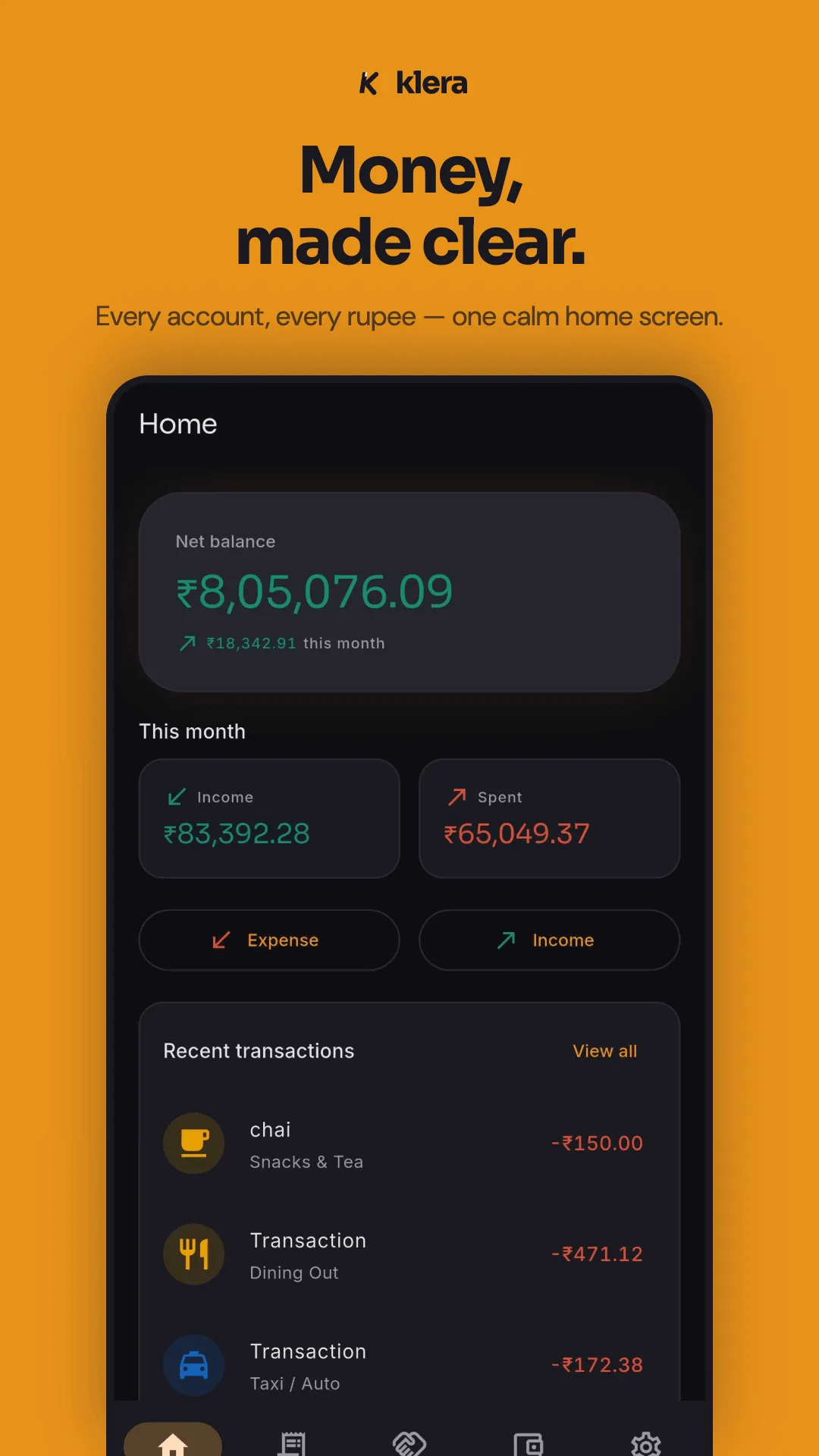
Most expense trackers die of typing: two weeks of dutiful entry, then a gap, then deletion. Klera fills itself in without a bank login — payment notifications captured on the device, bank and UPI statements imported from a file, three-tap entry for everything else — and keeps the whole record on your phone, encrypted, with no account and no server. Free on Android and iPhone, income and expenses both, with an AI that answers your money questions offline.
Free · No sign-up · No bank login
The reason most expense trackers get deleted
It is not the charts, and it is not the price. It is the typing. An expense tracker only works if the record is complete, and a record you maintain by hand stops being complete the first busy week. So the honest test of any expense tracker app is not what it shows you — it is how the data gets in. Klera gives you four ways, and none of them is handing over your bank password.
| The way in | What it needs | How it works |
|---|---|---|
| Type or say it | Nothing | Amount first, category, done — three taps. Quick add understands plain English and Hinglish ("200 chai, 300 fuel" logs two categorised expenses), typed or spoken. |
| Capture payment notifications | Notification access, allowlisted senders | The UPI and bank notifications your phone already shows are parsed on the device. No inbox access, no bank login, nothing uploaded. |
| Read bank SMS (optional) | SMS permission — think before granting | Android has no bank-only SMS scope, so this permission covers the whole inbox. Klera keeps it optional, off by default, filtered to allowlisted bank sender IDs and parsed on the phone. |
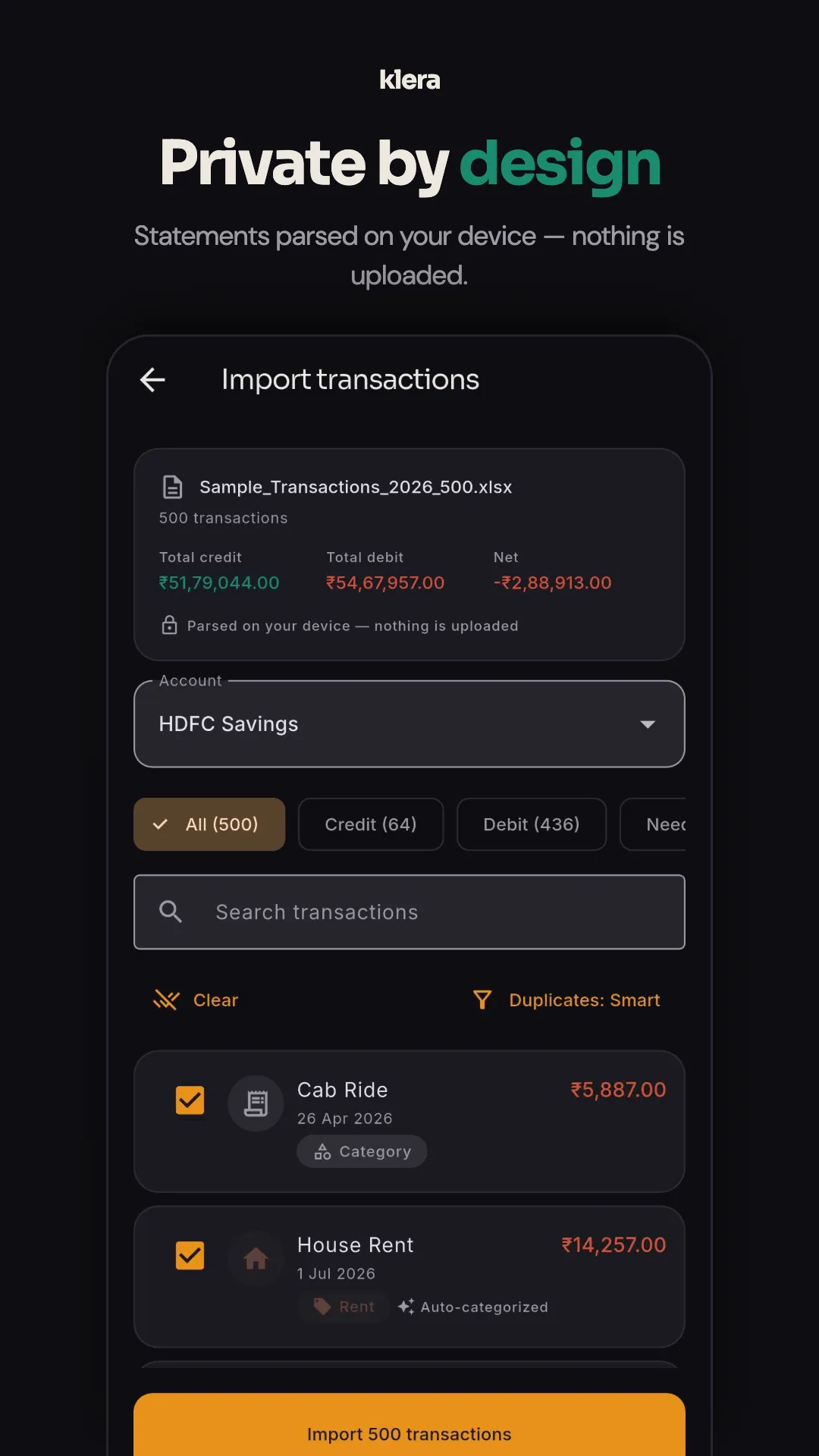
| Import a statement | A file | PDF, Excel or CSV — including password-protected bank PDFs and PhonePe, Google Pay and Paytm statements — parsed locally, auto-categorised, de-duplicated, with one-tap undo. |
The permission column is the point: every route is parsed on your phone, so an SMS or a notification never leaves the device, and a statement file is read locally and discarded. If you are weighing the SMS route, we wrote up what that permission actually grants — including for our own app. Years of history come in the same way: import old statements and the duplicate detection keeps re-imports from double-counting.
What a complete record gets you
Logging is the cost. This is what it buys — computed on your phone, from your own rows, with nothing uploaded.
- Income and expenses, not just expenses — Expense, Income and Transfer modes, payee memory that prefills category and account, and a category-wise income-vs-expense summary you can export as a simple P&L.
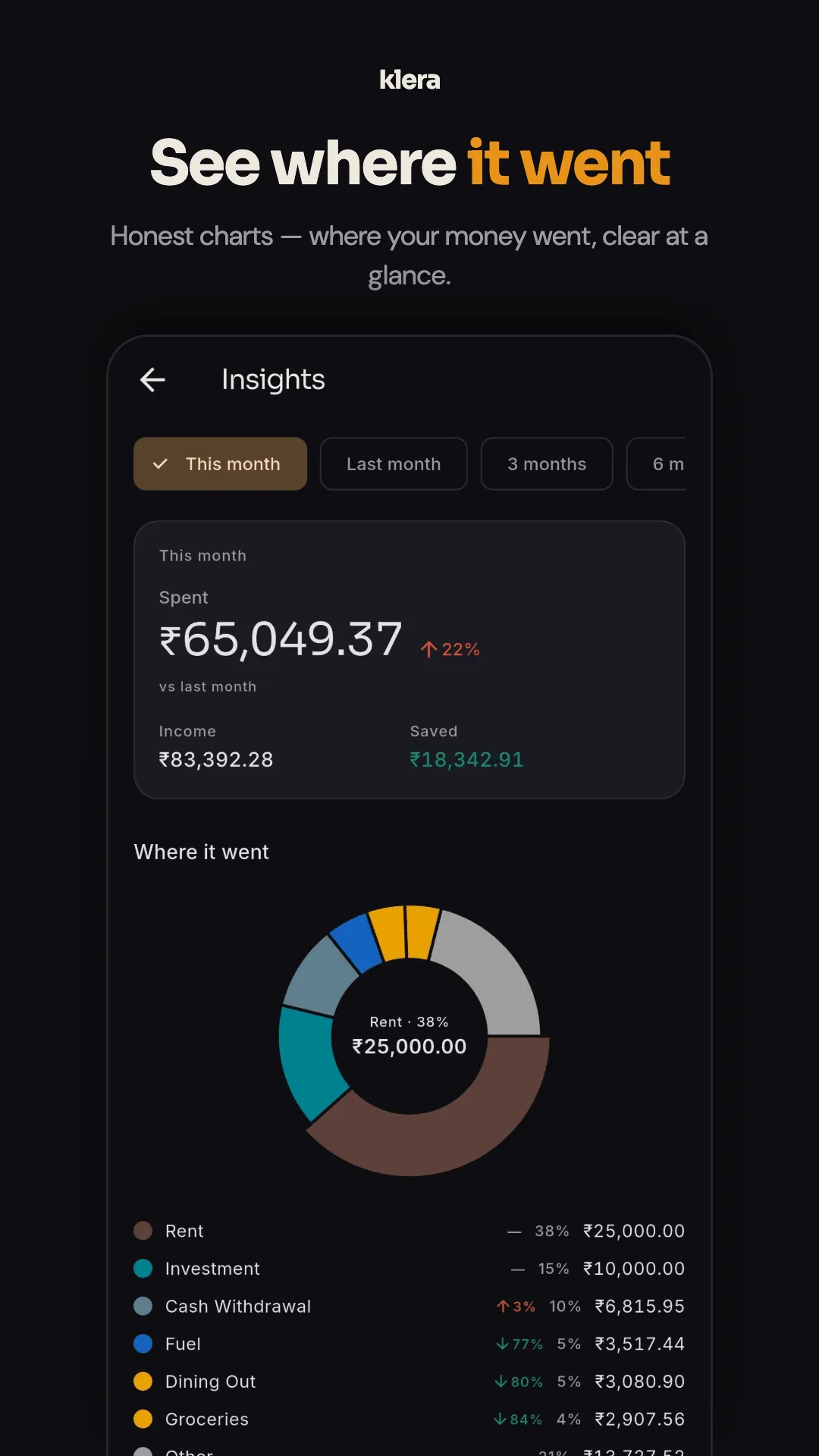
- Insights that answer "where did it go?" — spend heatmap, category trends, top merchants, cash vs digital split, savings rate, and a yearly Money Wrapped.
- Budgets that warn before, not after — one monthly total across Needs, Wants, Investments and Learning, with overspend alerts. The budget tracker page covers the method.
- Bills that post themselves — scheduled rent, EMIs, SIPs and subscriptions written into the ledger on time, with reminders.
- The rest of your money in the same place — accounts and transfers, investments with XIRR, net worth, a full loan manager and an udhaar ledger. The money manager page shows the whole picture.
- Widgets so you see it without opening the app — eight on Android, amounts masked by default while app lock is on.
Ask, instead of digging through charts
The newest thing in this category is the chat box, and most apps built it the obvious way: upload your transactions to a cloud language model and print the reply. Klera's assistant, Ask Klera, runs on the phone instead — your question is matched against a catalogue of known question shapes and the answer is computed arithmetically from the local ledger, by the same code that draws the charts. "Can I buy a phone for 30000?", "kitna lena hai Ramesh se?", "what bills are coming up?" — answered in airplane mode, with the figures shown so the working is checkable. It even logs for you: "200 chai, 300 fuel, 200 movie" becomes three categorised expenses. The design, and what it deliberately refuses to do, is on the AI expense tracker page.
Free, and what free means here
A free expense tracker app is funded by something. Here is our answer, stated outright so you are not left to find it: Klera is funded by ads. A few quiet native slots on screens like Home and Insights — never on the add-expense keypad, never on the backup, export or delete screens — and the ad network is never given a transaction, balance or category. Every feature is included: no paywall, no premium tier, and the AI costs nothing per question because there are no model tokens to buy. The one thing for sale is an optional ad-free subscription — ₹30 a month or ₹300 a year — which removes the ads and changes nothing else. We never sell your data; there is no account, so there is not even a profile to sell.
Private by architecture, not by promise
An expense tracker sees everything — salary, rent, habits, debts. Klera's answer is structural: there is no server in the design. Your ledger lives in an AES-256 encrypted database on your phone, the key never leaves the device's secure hardware, the app locks with biometrics or a PIN and blocks screenshots on financial screens, and the optional backup is encrypted with your passphrase before it enters your own Google Drive — unreadable by us and by Google. Because there is no server, every feature works with the internet off; that claim is verifiable in about a minute, and the offline expense tracker page shows you exactly how to test it — on our app or anyone else's. The complete list of network calls the app does make is published on the privacy policy.
How to choose an expense tracker app
Five questions separate the trackers that last from the ones that get deleted in February — ours included. Ask them of anything you install.
- How does data get in? Manual entry is why people quit — the app that survives is the one that fills itself in. Look for notification capture and statement import before anything else. A bank login is the convenient answer, but it hands your credentials and your history to a server.
- Where does the data live? On your phone, encrypted, or on the company's servers? An expense tracker sees everything — salary, rent, habits, debts. If the answer is "our cloud", the follow-up is: what happens when the company is breached, acquired, or shuts down?
- What does free actually mean? Free trackers are funded somewhere: ads, a paywalled "premium", or your data. Read which one. The honest versions tell you outright; the others make you find out.
- Can you leave with your data? CSV and PDF export at minimum, ideally a complete machine-readable dump. A tracker without an export is a subscription to your own history.
- Does it grow past expenses? The record is step one. Budgets that warn before you overshoot, goals, investments and debts are what turn a log into decisions — otherwise you will be running three apps by June.
We keep an honest comparison of Klera against Money Manager, Cashew, Monefy, MyMoney and Ivy Wallet — including the rows where each of them beats us.
When Klera is the wrong expense tracker
Stated plainly, because the wrong user will be disappointed and we would rather they use a tracker that fits.
- You want automatic bank sync. Klera never connects to your bank. If a bank-fed ledger with zero effort is the requirement, a cloud tracker is the correct answer.
- You use two devices, or share the ledger. Your data lives on one phone; encrypted backup moves it, but nothing syncs live yet.
- You want group bill-splitting. Klera tracks udhaar between you and one person at a time, not group settlements.
If none of those describes you, trying it costs nothing — there is no account to create, and no account to close.
Expense tracker app FAQ
What is the best expense tracker app?
It depends on one question: do you want a bank-connected cloud service, or a private tracker you control? If hands-off bank sync matters most, pick a cloud tracker and accept that your history lives on its servers. If you want the record without the exposure, pick a tracker that captures on the device and imports statements. Klera: Offline Expense Tracker (Google Play package com.kleraapp) is built for the second answer — free, no account, AES-256 encrypted, with notification capture, statement import and an on-device AI. We keep an honest comparison with Money Manager, Cashew, Monefy, MyMoney and Ivy Wallet on this site, including where each one beats us.
Is Klera really a free expense tracker app?
Yes — every feature is free, with no paywall and no premium tier holding features back. The AI assistant, statement import, investments, loans, budgets, widgets and exports are all included. It is funded by a few quiet native ads that are never shown on the add-expense keypad, and the ad network never receives a transaction, balance or category. An optional ad-free subscription — ₹30 a month or ₹300 a year — removes the ads and changes nothing else.
How can an expense tracker app work without a bank login?
Because everything it needs is already on your phone. UPI and bank transaction notifications can be captured and parsed on the device from an allowlist of senders. Bank statements — PDF, Excel or CSV — can be imported and parsed locally, with auto-categorisation and duplicate detection. And quick add takes typed or spoken entries in English or Hinglish. None of these routes involves your bank credentials or a server.
Can it track Google Pay, PhonePe and Paytm spending?
Yes, two ways. Live: turn on transaction-notification capture and UPI payments are logged as they happen, parsed on the device. Historically: export a statement from PhonePe, Google Pay or Paytm and import it — those statements parse end to end, with duplicate detection so importing twice does not double-count.
Does it track income too, or only expenses?
Both, plus transfers. The add screen has Expense, Income and Transfer modes, and money sent to a person can be flagged as udhaar so it is never miscounted as spending. The export includes a category-wise income-and-expense summary usable as a simple P&L, with April–March financial-year presets.
Is an expense tracker app safe? What can this one see?
A tracker is only as safe as where it keeps the data. Klera keeps yours on your phone in an AES-256 encrypted database, with the key held in the device's secure hardware. There is no account and no Klera server holding your ledger, so there is nothing to breach or sell. The app adds a biometric or PIN lock and blocks screenshots on financial screens, and the optional backup is encrypted with your passphrase before it goes into your own Google Drive.
Does it need an internet connection?
No. Every feature — entry, budgets, insights, import, export, the AI assistant — works in airplane mode, because the work happens on your phone. The full argument for why that matters, and a one-minute test you can run on any tracker, is on our offline expense tracker page.
Which phones does it run on?
Android and iPhone. On Android it is on Google Play under the package com.kleraapp; on iPhone it is on the App Store as “Klera: AI Money Manager” (iOS 16 or later) — use those handles to get exactly this app, since other products also use the name Klera. It ships in six languages: English, Hindi, Spanish, French, Telugu and Urdu. The home-screen widgets and bank-SMS capture are Android-only.
Can I get my data out again?
Yes, and you should demand this of any tracker. Klera exports transactions to CSV and PDF with date, account, category and type filters plus financial-year presets, produces a per-person udhaar statement, and offers a one-tap complete JSON export of everything. There is no lock-in because there is no account to lock.
Does it do budgets as well as tracking?
Yes — one monthly total split across four buckets (Needs, Wants, Investments, Learning) with overspend alerts before the money is gone, plus monthly spend goals and savings goals you can lock an account to. It deliberately does not use a fifty-category budget model; the budget tracker page explains why fewer, bigger buckets survive longer.
Read next
- Budget tracker app — alerts before you overspend, not autopsies after
- Money manager app — the full picture past expenses
- Offline expense tracker — the airplane-mode test, and why it matters
- How the on-device AI works, and what it refuses to do
- The best private expense tracker apps, honestly compared
- Getting years of history in without giving up your inbox
Install it, add one chai, see for yourself.
Free, no sign-up, no bank login — and nothing to cancel if it isn't for you.